
The future of AI-native engineering are agents working with your team

You’ve probably used an AI coding assistant by now. Paste a prompt, get an answer, maybe some generated code. It works. Sometimes surprisingly well.
But the hardest part of building software was never typing the code. It was figuring out what to build. And that knowledge (more often than it should) doesn’t live in your codebase. It lives in the heads of your coworkers. Sometimes not even there, if they wrote the ticket on a Friday afternoon.
The context gap
We’ve all been there. You open a Jira ticket. The description says “Users can’t export reports correctly.” That’s it. No repro steps, no expected behavior, no screenshots.
What do you do? You walk over to the QA engineer who filed it and ask: “Hey, which report? What format? What does ‘correctly’ even mean here?” Then maybe you ping the PM: “Is this a regression or did we never support this case?” Two Slack threads and a quick huddle later, you finally have enough context to start writing actual code.
We all do this dance. It’s half the job, honestly. The other half is meetings about the meetings where you got this context (have you ever been in a pre-alignment meeting to discuss the brief that will be discussed in the meeting and finalize the third version of a document? Yeah - it’s a nightmare, isn’t it?).
Now replace yourself with an AI agent. You give it the same ticket. It reads the description, stares at the codebase, and makes its best guess. Sometimes it nails it. Often it doesn’t, because it was missing the same context you would have asked for. Except nobody told it that asking was an option.
This is the context gap. Reactive agents, the prompt-in-answer-out kind, hit a ceiling when the information they need isn’t written down. And let’s be real: if your team documented everything properly or used SDD, you wouldn’t need half your Slack channels.
What if the agent could just ask?
That question is what got me building this proof of concept. The idea is almost disappointingly simple: give the AI agent a Slack account and let it talk to people, like any other colleague.
Picture a Jira ticket landing with a vague bug report. The agent picks it up, reads the description, scans the code, and realizes something is unclear. Instead of guessing (or confidently doing the wrong thing, which is the AI specialty), it opens a Slack thread and asks the QA engineer: “I see the export fails for PDF reports, but can you confirm which endpoint you were hitting? Was this on staging?”
The QA engineer sees a normal Slack message. They reply when they get a chance. The agent gets the answer and keeps going.
Or say the agent is working on a new feature and the spec has an ambiguity. Does the discount apply before or after tax? Rather than picking one and hoping (the classic “I’ll ask forgiveness later” approach that has never once gone well), it messages the Product Manager directly.
The project is open source: github.com/alfonsograziano/task-draft-agent
How it works
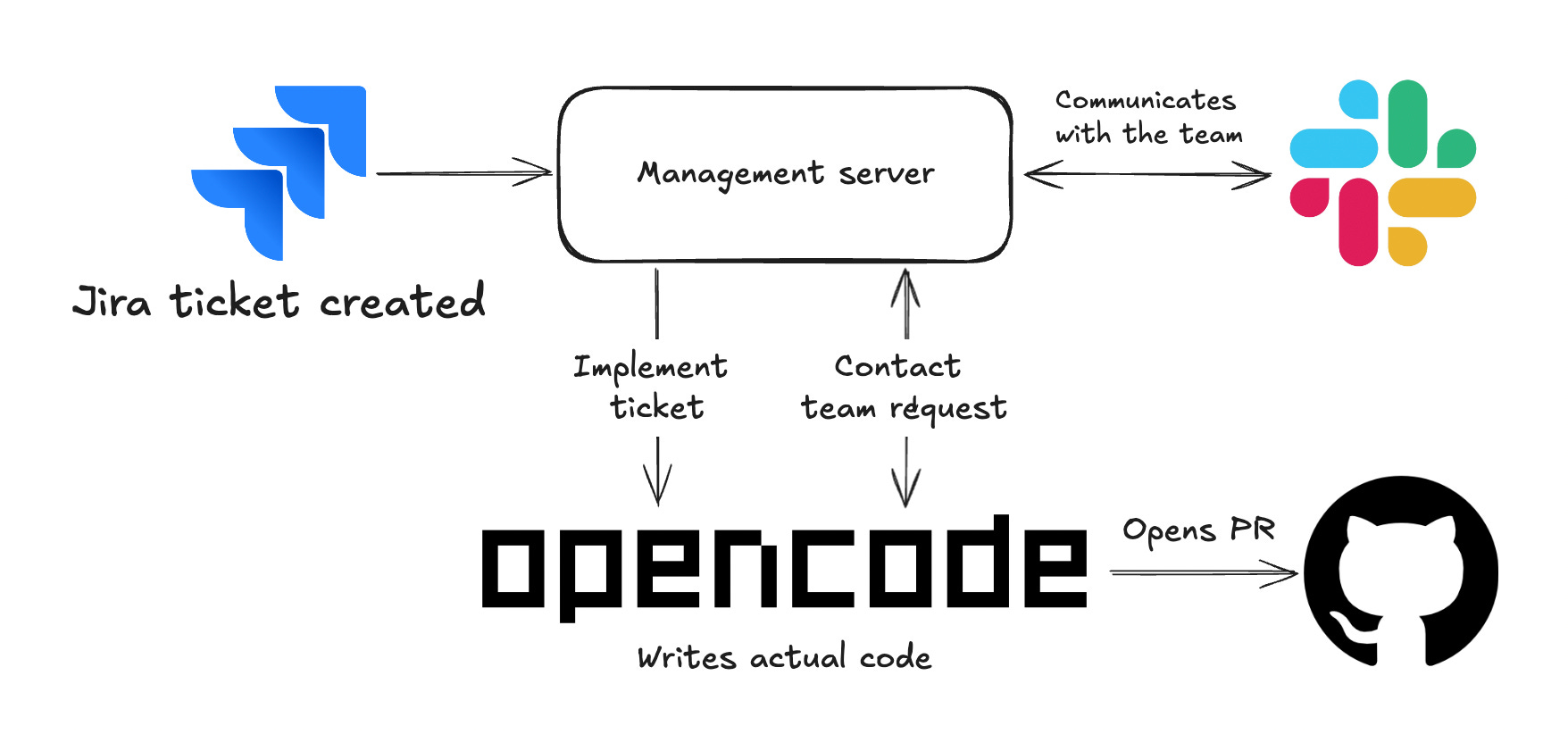
The system ties together three tools most engineering teams already use: Jira, an AI coding agent (Opencode), and Slack. Yes, another Jira integration. I know. Bear with me...
When a Jira ticket moves to a specific column like “Ready for Investigation,” a webhook fires. The management server picks it up, spins up a new agent session, and opens a Slack thread where the team can follow along.
The agent gets a prompt built from the ticket details (summary, description, priority, reporter) plus instructions on how to communicate. It has a config with team members with their expertise areas and Slack handles, so it knows who to bug about what. Think of it as an onboarding doc, except the agent actually reads it.
As it works, the agent can post status updates to the thread, DM specific people with questions, or flag blockers when it’s stuck.
There are three urgency levels for messages. An “info” is a status update: “I’ve identified the affected module, starting the fix.” A “question” means it needs clarification but can keep working on other things. A “blocker” means it genuinely can’t proceed without an answer and pauses execution. Think of it as the difference between a casual Slack message and a “hey, are you there?” followed by three more pings.
Everything goes through Slack threads, so the team sees what the agent is doing. No black box. You can watch it think in real time, which is either reassuring or mildly unsettling depending on your feelings about AI.
The async part is what makes it real
This is the thing I keep coming back to, and what separates this from chatting back and forth with a bot in a terminal.
The architecture is event-driven. When the agent asks a question, it doesn’t just freeze and wait. If the question is a blocker, sure, it pauses until someone answers. But if it’s a regular question, the agent keeps going. It does more research, digs into related code, works on what it can. Like a human coworker who fires off a Slack message and then continues to research while waiting for a reply. (Unlike some coworkers who will ping you six times while you’re in a meeting.)
If the agent reaches a point where it’s confident enough, it opens a PR on its own. If it still needs input, it waits. Either way, it doesn’t burn tokens staring at an empty Slack thread.
Then three hours later, the QA engineer finishes lunch, checks Slack, and replies: “Yeah, it’s the /api/export/pdf endpoint, staging environment, happens with reports over 50 pages.”
A webhook fires. The system matches the reply to the right agent session and resumes the work. The agent picks up exactly where it left off, now with the missing context. No “sorry, I lost my train of thought” moment. That’s one advantage over human coworkers, I guess.
This is how teamwork already works in practice. You ask a colleague something, you go do other stuff, they get back to you when they can, you pick up the thread. The agent follows the same rhythm instead of demanding your immediate attention.
Under the hood
For those who want to know (and I know you do, this is a dev newsletter): the management server is Node.js with Fastify. SQLite tracks the mapping between Jira tickets, agent sessions, and Slack threads. Nothing exotic. Slack integration uses Bolt for event handling. It’s less than 10 code files, if you want to take a look :D
When someone replies in a thread, the system looks up which agent session owns it. If the agent is mid-task on something else, it aborts the current step and resumes with the new context. If the session was idle, it just picks back up with the reply as input.
There’s a prompt template you can customize to control how the agent approaches work. The team config file defines who knows what, so the agent asks the right person instead of @here-ing the whole channel at 9 AM. Your coworkers will thank you.
Why I think this matters
I want to be clear: this is a proof of concept, not production software. Please don’t deploy it and then ping me when things go sideways.
But I keep thinking about the pattern behind it. We’ve been treating AI agents as something you interact with: you ask, they answer, you close the tab. Real engineering work doesn’t look like that. It’s collaborative, async, and messy. People ask questions across time zones. Context builds over days. Half the important decisions live in Slack threads that nobody will ever look at again.
An agent that can participate in that back-and-forth, that can ask for help and then wait for an answer that might come hours later, is a different kind of tool than one that only works in a single prompt-response cycle.
I think the gap between “AI that writes code” and “AI that ships features” is mostly a context gap. The most reliable source of context in any company is the people who work there. Giving agents access to those people makes them useful for the kinds of tickets you’d normally say are too messy for AI. In my experience, that’s most of them.
Check it out
The repo is here if you want to dig in, break things, or tell me everything I did wrong: github.com/alfonsograziano/task-draft-agent
I’m curious where this goes next. What happens when the agent can jump into a PR review conversation? Or ask an architect about a design decision before writing code? I don’t have answers yet, but I’ll keep building and sharing what I find. Worst case, we end up with a bot that asks better questions than most junior devs. (I’m allowed to say that, I was one.)
Interesting idea, especially to help reduce the context gap.
It somehow reminds me of the “tools” concept in LLM agents: instead of letting the model guess or hallucinate missing information, we give it ways to retrieve concrete context.
Here it feels like humans become another kind of tool the agent can query when needed.